Written by educators who’ve debugged the same IndentationError with hundreds of kids, week after week.
Your 10-year-old just slammed the laptop lid shut. The Scratch project they were excited about an hour ago, the one with the dragon and the maze, keeps freezing. They’re done. And in the silence that follows, a question shows up that a lot of parents are sitting with right now: Are they ready for real code? Should they try Python coding?
If you’ve Googled “learn Python for beginners” and felt a little lost in adult tutorials, code editor setup guides, and computer-science jargon, you’re not alone. Most of the top results are written for adults teaching themselves. They aren’t wrong, but they aren’t built for an eight-year-old who finished their Scratch dragon and a parent who never wrote a line of code in their life.
At SkoolOfCode, we’ve taught Python to hundreds of kids aged 7 to 17. This guide is what we wish more parents had when they started looking: what works, what doesn’t, and what learning Python actually looks like for a child today.
In this guide:
- Is Python a Good First Language for Beginners?
- What Your Child Needs Before Starting Python
- Your First Python Program (With Real Code)
- How Long Does It Take a Kid to Learn Python?
- Scratch vs Python vs JavaScript: Which Should Kids Learn First?
- The SkoolOfCode 4-Step Approach to Python Coding
- How to Learn Python the Fun Way at Home
- Common Beginner Mistakes (And How to Help Your Child Avoid Them)
- Frequently Asked Questions
Is Python a Good First Language for Beginners?
The short answer is yes. Python is one of the best first languages for absolute beginners, and it’s especially well-suited to programming for kids.
Python has stayed on top of “best first programming language” lists for nearly a decade, and it isn’t marketing. The language was deliberately designed to be readable. A line of Python coding looks more like a sentence than a wall of symbols:
if score > 10:
    print("You won!")
Compare that to the equivalent in older languages with semicolons, curly braces, and type declarations, and you can see why a child reads Python and immediately gets it. There’s almost nothing in the way of the logic.
What is Python programming, in practical terms for a parent? It’s a general-purpose language used by Google, NASA, Netflix, and most of the AI tools your child has already touched. The same language used to build most of today’s AI tools is the language a 12-year-old can write their first game in. That continuity matters. Your child isn’t learning “kids’ code” they’ll need to unlearn later. They’re learning the real thing, just at the right pace for their age.
One caveat: Python is a great first text-based language, but it isn’t always the right first language for very young children. In our classes, most kids do better starting with block coding (Scratch) at age 7-9 and moving to Python around 9 or 10. We unpack that decision in Scratch vs Python for Kids.
What Your Child Needs Before Starting Python (Spoiler: Not Much)
Most parents we talk to overestimate what’s required to get started with Python coding. The real list is short.
A computer. Any reasonably modern laptop or desktop is fine. Chromebooks work too. Python runs in a browser tab through editors like Replit or Trinket, so there’s nothing to install. A tablet is harder, not impossible.
An hour, two or three times a week. Daily isn’t necessary. Consistent is. Kids who code for forty minutes twice a week progress faster than kids who do a two-hour marathon every Saturday and then forget everything by Tuesday.
A patient adult nearby (some of the time). Especially in weeks one and two, when a missing colon or a wrong indent stops the program cold. A parent doesn’t need to know Python. They just need to sit close enough that the child doesn’t quit on the first error.
That’s it. No prior experience with Scratch is required, though it helps. No math beyond what they’re doing in school. No expensive curriculum. The barrier to entry is much lower than most parents think.
Your First Python Program (With Real Code)
If your child has fifteen minutes right now, they can write their first Python program. Open Replit (or Trinket, or any free online Python editor) and try this:
print("Hello, World!")Press Run. A line of text appears: Hello, World!. That’s a working Python program. print is a command that tells Python to display whatever’s in the parentheses on the screen. Every Python programmer in the world has written this, and it usually produces a small smile.
Now try giving the program a memory:
name = "Aarav"
print(f"Hi, {name}! Welcome to Python.")
Two things are new. First, name = "Aarav" is a variable. Python sets aside a small box of memory, labels it name, and puts the word “Aarav” inside. Second, the f before the quotation marks lets Python read what’s inside the curly braces ({name}) and replace it with the value. Run it, and Python prints: Hi, Aarav! Welcome to Python.
Change "Aarav" to your child’s name. Try "Maya" or anything else, then run it again. When kids see their own name on the screen, that’s when they lean in.
Let’s make Python repeat itself:
for i in range(5):
    print("Python is fun!")
Run that, and you’ll see the message printed five times. The for line is a loop. range(5) gives Python the numbers 0, 1, 2, 3, 4, and the indented print line runs once for each.
Now let’s let the program make a decision:
age = 11
if age >= 10:
    print("You're old enough for Python!")
else:
    print("Try Scratch first.")
That’s a conditional. Python checks whether age is 10 or more, and runs only the matching line. Change age = 11 to age = 7 and run again. Python now picks the other branch.
A while loop keeps going until something stops it:
guesses = 0
while guesses < 3:
    print("Keep guessing!")
    guesses = guesses + 1
Three “Keep guessing!” lines, and then it stops. That’s the same pattern you’ll use in a guess-the-number game.
Lists hold multiple values at once:
foods = ["pizza", "samosa", "ice cream"]
print(foods[0])
print(foods[2])
Python prints pizza then ice cream. Counting in code starts at 0. Kids find this strange for about a day, and then it just becomes normal.
Dictionaries are like lists with labels:
student = {"name": "Aarav", "age": 11, "favorite": "Python"}
print(student["favorite"])
Python prints Python. Dictionaries are how programs remember structured information, every game’s high-score table is built on this idea.
Functions let you reuse code:
def greet(name):
    print(f"Hi, {name}! Ready to code?")

greet("Aarav")
greet("Maya")
Two greetings, one block of logic. When a child realizes they can write a function once and reuse it as many times as they like, that’s usually when Python coding starts to click for them.
Those eight snippets (print, variable, loop, conditional, while, list, dictionary, function) are about 90% of what your child needs to start building real little programs.
How Long Does It Take a Kid to Learn Python?
This is the question most online tutorials don’t honestly answer. Here’s what we typically see across the first year for a child starting at ages 8 to 12, doing Python coding consistently 2-3 hours a week.
Week 1. They can write and modify simple print statements, work with variables, and build their first guess-the-number game. The reaction we see most often: a giant grin when they realize they can make the computer talk back.
Month 1. They’ve written loops and conditionals. They’ve built two or three small games, usually Hangman, Guess the Number, and Rock-Paper-Scissors. They start asking, “What if I…?”, which is when we know they’ve crossed from passive learner to creator.
Three months. They’re using lists and dictionaries comfortably. They can read someone else’s code and figure out roughly what it does. They’ve built their first project with the Turtle library and have probably broken it three or four times along the way. That breaking and fixing is where most of the real learning happens.
Six months. They’re handling errors without panicking. They’re using libraries like random. They’ve built something they’re proud enough to show a relative: a small game, a quiz, a basic animation. They start to feel like a programmer, not just someone learning to code.
One year. They’ve worked with file handling, exception handling, and the basics of object-oriented programming. They can build a Flappy-Bird-style game from scratch, with classes and objects, and explain what each part does.
A pattern we see across the first year: progress is bumpy, with plateau weeks and sudden leaps, and the kids who treat coding like a creative tool (“I want to make X”) move faster than the ones who treat it like homework. That’s the mindset to encourage at home.
Scratch vs Python vs JavaScript: Which Should Kids Learn First?
A common parent question: with three popular options, where does a child actually start? Here’s how we think about it.
| Language | Best for ages | Difficulty | What kids build | Path forward |
|---|---|---|---|---|
| Scratch (blocks) | 7-9 | Easy, drag and drop, no typing | Animations, simple games, interactive stories | Bridge to Python at 9-10 |
| Python | 9-17 | Moderate, real text code, very readable | Games, AI projects, data tools, automation | Direct path to AI, ML, web back-end |
| JavaScript | 12+ | Harder, more punctuation, browser quirks | Interactive websites, browser games | Direct path to web development |
In practice: most kids start with Scratch, move to Python around age 9-10, and pick up JavaScript later if they want to build websites. Python is the strongest single bet for a child who wants to keep going. It’s the language behind most of today’s AI work, and the gap between “Python for kids” and “Python for adults” is small enough that a kid never needs to start over.
The SkoolOfCode 4-Step Approach to Python Coding
We’ve refined a four-step path that takes a child from zero Python to building a Flappy-Bird-style game over roughly 9-12 months of weekly classes. Each step is built around projects, because kids learn vastly more from building something than from being lectured about syntax.
Step 1: Python Basics Through Games
The first weeks introduce printing, variables, conditionals, loops, Strings, lists, dictionaries, and the random library. We don’t introduce these as abstract concepts, we introduce them through games kids want to play.
The first project is usually a Guess-the-Number game, which uses random numbers and a while loop. From there, we build a Hangman game, which exercises lists and string manipulation, and a Rock, Paper and Scissors game, which reinforces conditionals and randomness.
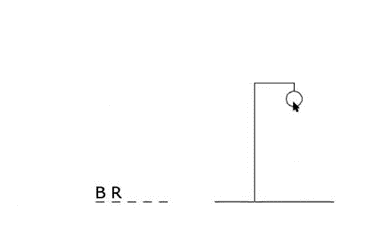
By the end of Step 1, kids can write their own variations, a hangman that uses sports trivia, a rock-paper-scissors that keeps score across rounds. They aren’t memorizing syntax. They’re using it.
Step 2: Python Library (Turtle)
Step 2 introduces built-in modules, the idea that Python is more than its core language, and that in-built packages let you pull in pre-built tools for specific jobs. We start with the Turtle library, which lets kids draw shapes and animations on screen with simple commands.
This is the visual breakthrough moment. Children create geometric shapes in different colors, then move on to a Fidget Spinner animation, a Snake game, and (our personal favorite) a Turtle Race that combines user-defined functions, the random library, and the Turtle library all at once.
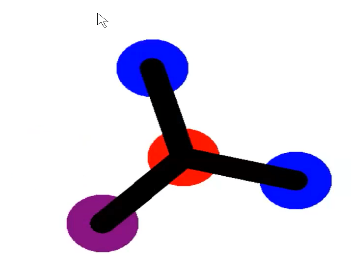
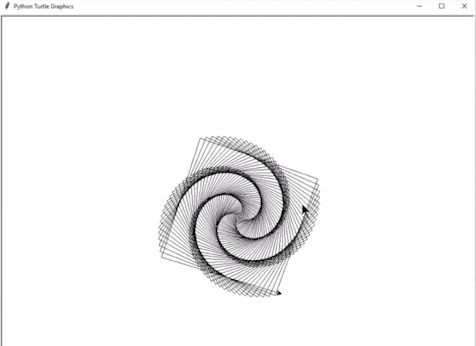
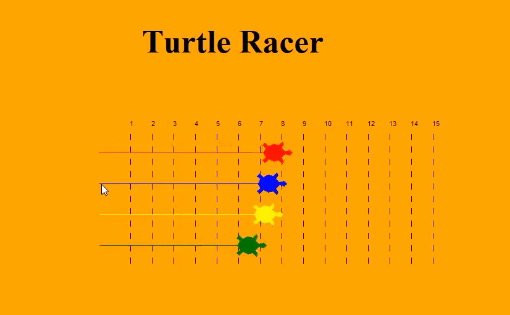
The reaction we see most often in Step 2: a child who’s been quietly skeptical for two months suddenly tells their sibling, “Look what I made,” and turns the laptop around.
Step 3: Data Structures and File Handling
Now we go deeper. Step 3 introduces queues, stacks, and circular queues, taught through small Python coding exercises. The Tower of Hanoi is where we introduce recursion, a concept that’s hard to teach in the abstract but lands cleanly when a child watches Python solve the Tower in front of them.

We also introduce file handling (reading from and writing to files), exception handling (catching errors gracefully instead of crashing), and JSON. A favorite project here is the Interactive Dictionary, a program that takes a word and returns its meaning, built using a JSON file as a tiny database.
Step 4: Object-Oriented Programming
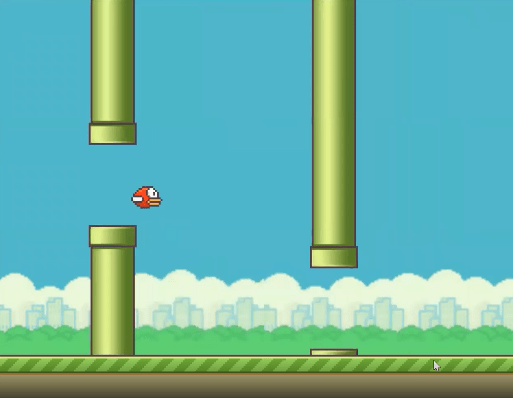
Step 4 is the bridge from “I can write a script” to “I can design a system.” We introduce Classes, Objects, Encapsulation, Abstraction, Inheritance, and Polymorphism, but always through a real project.
Smaller projects like Colorful Flowers introduce the principles. The final project, typically a Flappy Bird clone or a Space game, uses OOP throughout, plus everything from the previous three steps. By the time a student finishes Step 4, they’re not learning Python coding anymore. They’re using it to build.
See our full AI Builder curriculum, meet our teachers, or browse the student showcase to see what kids actually build.
→ If your child is ready to move from messing around with Python to a structured path, see how our Python track works for kids.
How to Learn Python the Fun Way at Home
The biggest recent change in beginner Python isn’t the language itself. Python has barely changed. It’s how kids practice. AI-assisted coding tools now sit alongside every Python learner, and parents need a clear sense of when they help and when they hurt.
In our classes, we teach kids to learn Python the fun way using a simple rule for working with AI tools: try it for fifteen minutes first. If you’re still stuck, ask the AI to explain why, not to give you the answer. Used like this, AI becomes a tutor on demand. Used the wrong way (asking the AI to write the whole program), it short-circuits the confusion that learning actually requires.
Our instructors lean into the same idea. When a student hits a stubborn IndentationError, we don’t fix it for them. Instead, we ask them to read the error out loud. Most of the time, that’s enough. The error stops feeling personal, and the child realizes Python is just telling them where the indent is missing.
A few habits that keep python coding fun and productive at home:
- Build something every session. Even a one-line tweak to yesterday’s game counts. The goal is a working thing, not a perfect thing.
- Save broken code in a “graveyard” folder. Coming back to a six-week-old broken project and fixing it is one of the most satisfying moments in early Python learning.
- Show the work. A weekly five-minute demo to a parent, sibling, or relative does more for motivation than a hundred YouTube tutorials.
- Ask for help out loud. The act of explaining what’s broken to another person solves half of all beginner bugs before you even hit Run.
These are the same habits we use to teach 8-15 year olds in SkoolOfCode’s live classes. They’re free, they’re simple, and they’re what separates kids who quit at week three from kids who are still building at month six.
Common Beginner Mistakes (And How to Help Your Child Avoid Them)
A few patterns we see repeatedly in the first weeks. Worth knowing about, because they’re easy to fix once you spot them.
Mistake 1: Copying code without understanding it. A child finds a Python game online, pastes it in, and runs it. It works. They feel like they coded, but they couldn’t change anything in it if asked. The fix: have them retype the code instead of pasting, and rename one variable. The act of changing one thing forces understanding.
Mistake 2: Skipping the project to chase the next concept. “I want to learn loops, classes, AI, all of it, now.” The fix: finish the small project in front of them first. Depth beats breadth for the first year.
Mistake 3: Watching tutorials instead of coding. Eight hours of YouTube creates the illusion of learning Python without any actual Python being written. The fix: most of their Python time should be them typing, not them watching.
Mistake 4: Giving up at the first error. Most kids read a red error message as the computer telling them they failed, when really it’s the computer telling them where to look. The fix: reframe with the child explicitly. “An error means Python is talking to you. What is it saying?” Within a few weeks, errors stop feeling personal.
Mistake 5: Comparing to other kids. Some kids click into Python in week 2. Some take three months. The path doesn’t matter; only consistency does.
Frequently Asked Questions
Is 8 too young to start Python?
For most 8-year-olds, yes. We recommend starting with Scratch at 7-9 and moving to Python around age 9 or 10. Exceptions exist for kids who already have a year or two of Scratch under their belt, they’re often ready earlier.
Can a child learn Python without learning Scratch first?
Yes, especially if they’re 10 or older and have the patience for text. Scratch is a helpful on-ramp, not a required one. We’ve taught Python directly to plenty of 10- and 11-year-olds who skipped blocks entirely.
How can my child learn Python the fun way at home, without a teacher?
Pick one small project at a time, a Hangman game, a guess-the-number game, a Turtle Race, and aim to finish it before starting the next. Use a free online editor like Replit. When stuck, look at the error message first, then ask for help. The pattern matters more than the tutorial.
Is Python still a good first language for kids today, or is it being replaced?
Python’s place is more secure than ever. It’s the leading language for AI, data science, and machine learning, all of which are growing fast. No serious challenger has emerged for programming for kids today.
How is learning Python different today compared to a few years ago?
The biggest difference is AI-assisted coding. Used well, it compresses the early frustration phase. Used poorly, it short-circuits understanding. Same language, new tools, same fundamentals.
My child got stuck and wants to quit. What now?
Take a week off and come back. Don’t push during the frustration window, that’s how kids learn to hate things. Most kids who quit Python at week three come back fascinated at week five if the pressure is off.
Does my child need a fancy laptop or paid software?
No. A basic Chromebook and a free online editor like Replit is enough for the first year.
Are coding classes worth it, or can a child learn Python alone?
Self-taught works for highly motivated 13+ year olds. For younger kids, a class adds two things free tutorials can’t: a peer cohort and an adult who can spot why they’re stuck in week three.
→ If your child is ready to start Python with a guided path and a real teacher, book a free trial class today. We’ll match them with the right starting point and run a no-pressure introductory session.
By: Ms. Divya Dalal, an educator working with SkoolofCode taking Scratch and Python classes. She has done MCA, Master in Technology in Software Engineering.